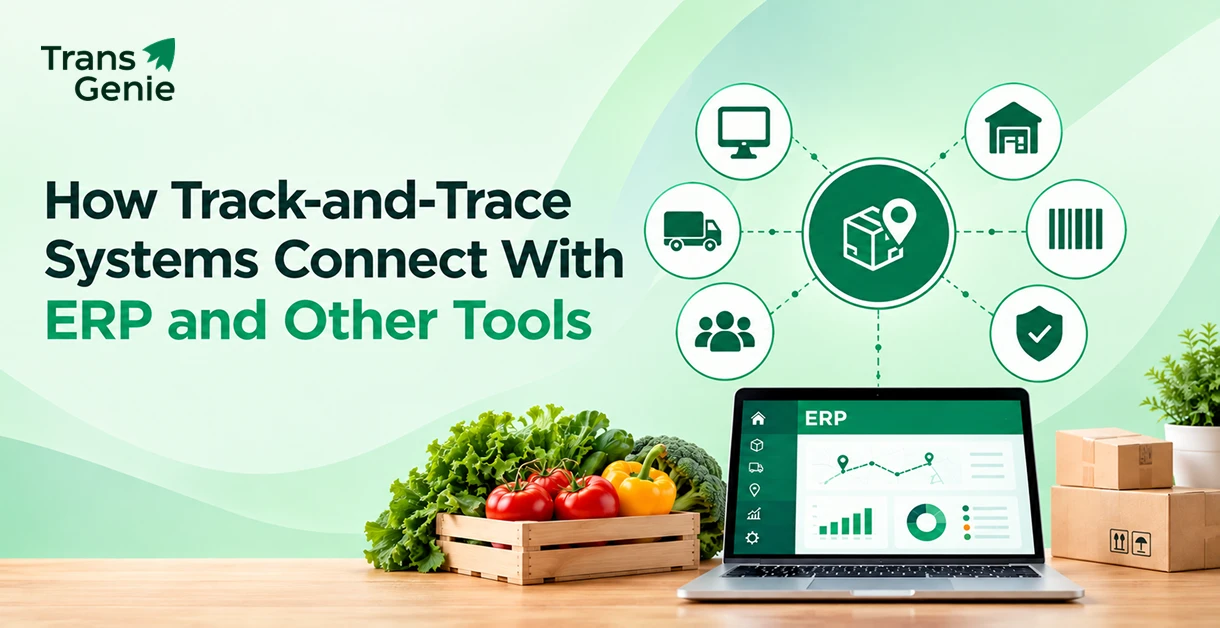
Track and trace management solutions help businesses connect the different systems that hold information about a product's journey. Your ERP knows what you bought, what you have in stock, and what you shipped. Your scanners capture the details when a lot was received or packed. Your suppliers may have origin and production records sitting in another system - or even in spreadsheets and emails.
The problem starts when you need to connect those pieces. By sync your ERP with traceability solutions, ERP systems, scanners, IoT sensors, supplier systems, and logistics tools, you can give operations and QA teams a clearer view of every lot.
The goal isn't to replace your existing systems. Rather, it is to connect them so the right traceability data is available when you need it. This involves what happened, where it happened, and which lots are affected when something goes wrong.
Here in this blog, we'll look at how these systems connect, what data moves between them, the tools involved, and what to consider before you start an integration.
What are Track and Trace Management Solutions?
Track and trace management solutions help businesses monitor a product's movement, history, and status across the supply chain. They connect the software, scanners, sensors, and connected systems to create a clearer view of where a product came from, what happened to it, and where it went next.
While these two terms are closely related, they actually answer different questions:
Track
- ✓ Shows where a product or lot is moving
- ✓ Focuses on movement and current status
- ✓ Helps answer “Where is it now?”
- ✓ Supports forward visibility
Trace
- ✓ Shows where a product or lot came from
- ✓ Focuses on origin and history
- ✓ Helps answer “Where did it come from?”
- ✓ Supports backward visibility
Tracking shows when a finished batch leaves your facility and reaches a distributor. Tracing can take that same batch back to the ingredients, supplier, farm, vessel, or production event linked to it.
Together, tracking and tracing give your teams end-to-end supply chain visibility. Instead of looking at individual records in different systems, they can integrate events and follow a lot through receiving, processing, storage, shipping, and delivery.
How are Track-and-Trace Systems Different from ERP?
An ERP manages core business operations that include purchasing, inventory, orders, production, and finance. A track-and-trace system focuses more on where products and lots come from, where they are, and what happens to them as they move through the supply chain.
These are two systems that work together rather than necessarily replacing one another. Integrating them helps operational and traceability data to move between systems and gives teams a more complete picture of each lot.
For a closer look at the difference between the two, see Seafood ERP vs Seafood Traceability Software: Which Do You Need?
What are the Benefits of Using Track-and-Trace Technology in Supply Chain Management?
Traceability solutions are intended to connect the records behind every lot. Thus helping teams to clearly see the entire journey from source to destination. When these details are synchronized across suppliers, production, inventory, and logistics, teams can quickly respond, retrieve records more easily, and make better decisions across the supply chain.
FDA states that the Food Traceability Rule is designed to help identify and rapidly remove potentially contaminated food from the market.
How Does Track-and-Trace Technology Improve Supply Chain Transparency?
Know the journey
From source to destination, it is possible to keep every lot connected.
It is possible to see where a lot came from, what happened to it, and where it went next without searching records from different systems.
Isolate the right lots
Turn a broad recall search into a targeted investigation.
Trace a problem back to its source and forward to where the affected lot was sent. This helps teams focus their response on the products that actually need attention.
Find records when you need them
Keep important traceability information ready for audits, customers, and compliance needs.
Instead of searching in spreadsheets, emails, and separate systems, teams can quickly access the information linked to a specific lot more easily.
Reduce repetitive work
Let connected systems share data instead of making teams enter it twice.
Connect the systems already used across your operation to reduce duplicate data entry and keep records more consistent.
Give buyers greater confidence
Make product origin and movement easier to verify.
Clear, connected records give businesses a stronger way to demonstrate where products came from and how they moved through the supply chain.
The bigger picture: Traceability is more than knowing where a product is. It connects the events behind each lot so your teams can understand its journey, investigate issues, and act on reliable information.
For a closer look at why product-level visibility matters, read Why Product Traceability Matters in Supply Chain Management.
Why Do Track-and-Trace Systems Need to Connect With Your ERP?
Your ERP, as well as your traceability system, holds important pieces of your supply chain data. Integrating them brings those pieces together, so your teams can work with the same details across operations, QA, inventory, and supply chain.
Think of it as a connected flow:
Why this Connection Matters
No repeated lot entry
Relevant lot and inventory data can move between the systems instead of being entered again.
Records stay aligned
Your inventory records and traceability records can reference the same lot information.
Recalls become easier to investigate
Teams can quickly connect a lot with its source, processing history, inventory, and shipments.
Audits take less searching
The information required for an audit can be pulled from connected records instead of several disconnected sources.
Teams work from the same information
Operations, QA, and supply chain teams get a more consistent view of what is happening with each lot.
The point isn't to replace your ERP. It's to link it with your traceability system so business and traceability data can work together.
How Does Track-and-Trace Software Integrate With ERP and Other Enterprise Systems?
An efficient track-and-trace software can connect with ERP and other enterprise systems through REST APIs, native connectors, EDI, file imports, or middleware. However, the right approach depends on the systems you already use, the data you need to exchange, and how frequently that data needs to move.
Here the goal is simple: get the right traceability data from the right system without creating another manual process.
REST APIs - for connected, real-time data
REST APIs help systems exchange data directly. For example, an ERP can send order or lot details to the traceability system, while traceability events can be shared back with other connected applications.
Native connectors - for ready-made integrations
A native connector offers a prebuilt connection between the traceability platform and a supported business system. This can help reduce the amount of custom development required during the implementation process.
EDI and file imports - when systems can't link directly
Not every ERP or supply chain partner has a modern API. When a direct API connection isn't available, EDI, CSV files, flat files, or scheduled imports can be used as another way to exchange information.
Middleware - when several systems need to work together
Middleware can sit between multiple applications and help move or transform data between them.
This approach can be useful when your supply chain has several systems that need to share data rather than having separate point-to-point connections.
GS1 standards - for consistent supply chain data
GS1 standards help businesses use consistent identifiers and data structures across supply chain partners. GTIN, GLN, and EPCIS support identifying products, locations, and supply chain events in a way that different systems can understand. EPCIS provides a standard way to share information about events in the supply chain. GS1 - EPCIS
The Result: One Connected View
So, no matter which integration method you use, the goal is the same: link the data that describes each lot's journey.
When these systems share the right information, teams can build a more complete single source of truth for traceability.
What Data Moves Between Track-and-Trace Systems and ERP?
A track-and-trace system and an ERP don't need to share every detail. They exchange the data required to connect orders, lots, products, processing events, inventory, and shipments across the supply chain. Here, the important part is the connection
The value isn't just in moving data from one system to another. It's in connecting those data points to the same lot or product.
| Data | Usually comes from | Why it matters |
|---|---|---|
| Purchase orders & receipts | ERP | Connects incoming products and lots with the right supplier, purchase order, and receiving record. |
| Lot & batch numbers | ERP or traceability system | Keeps lot records linked as products move between systems and supply chain stages. |
| Product details | ERP or traceability system | Identifies the product, item, quantity, and unit of measure associated with a lot. |
| Catch, harvest & origin details | Supplier, vessel, farm, or production system | Provides information about where the product came from and its source. |
| Processing & transformation events | Plant floor, scanners, or traceability system | Records what happened to a lot during processing, packing, repacking, or transformation. |
| Temperature readings | IoT sensors | Helps teams monitor and document cold-chain conditions during storage and transportation. |
| Shipments & customers | ERP or logistics system | Connects finished lots with shipments, destinations, distributors, and customers. |
| Traceability event records | Traceability system | Links receiving, shipping, transformation, and other events to the relevant lot. |
What Data Does FDA Require for Food Traceability?
For foods covered by the FDA Food Traceability Rule, required Key Data Elements (KDEs) are linked to the relevant traceability lot and Critical Tracking Event. These can include lot codes, product details, quantities, locations, dates, and reference documents. FDA Food Traceability Rule KDEs
The key is keeping the lot → event → location → shipment relationship connected across these systems.
What Other Tools Do Track-and-Trace Systems Connect With?
ERP integration is only one part of the picture. Track-and-trace systems can also connect with the tools used to capture, move, and report supply chain data.
- Barcode, QR & RFID Scanners: Used to capture lot, batch, and product events during receiving, processing, packing, and shipping.
- IoT Sensors: Help send temperature, location, and other monitoring data from cold-chain storage and transportation.
- Supplier Portals: Allow suppliers, farms, vessels, and other partners to share origin and product information.
- Warehouse & Logistics Systems: Useful in connecting inventory movements, storage events, shipments, and delivery information.
- Compliance & Reporting Tools: Helps bring connected records together for audits, customer requests, and regulatory reporting.
What are the Latest Innovations in Supply Chain Track and Trace Software?
Track-and-trace software is becoming more connected and easier to use. Barcode, QR code, and RFID scanning capture product and lot information, while IoT sensors can monitor conditions such as temperature during storage and transportation.
These systems can also connect with ERP, warehouse, logistics, and supplier systems through APIs, native connectors, EDI, file imports, and middleware. GS1 standards such as EPCIS help businesses share supply chain event information consistently.
The goal is simple: connect product, lot, location, and movement data so teams can see and follow the supply chain more clearly.
The Result: Your traceability system becomes a connected layer across the supply chain, not another isolated database.
What are the Main Features of Trace Management Software?
With trace management software, connecting product, lot, and supply chain data is easy and thus teams can follow products, investigate issues, and retrieve records when needed. The most useful capabilities include:
Open APIs & Native Connectors
- Connect the traceability platform with ERP, warehouse, logistics, supplier, and other business systems.
- APIs and connectors help data move between systems without creating another isolated database.
Lot-Level Tracking
- Track lots across suppliers, facilities, processing stages, inventory, and shipments.
- Keeping the lot code connected to related events helps in tracing a product backward or forward easily.
Real-Time Monitoring & Alerts
- Monitor connected events and receive alerts when important conditions or activities need attention.
- This helps teams respond before a small issue becomes a larger one.
Compliance Reporting
- Organize traceability records for regulatory, audit, and customer requirements.
- For foods covered by the FDA's Food Traceability Rule, records must link relevant Key Data Elements to the appropriate traceability lot.
Supplier Onboarding
- Give suppliers and other partners a structured way to provide product, lot, and origin information.
Audit & Recall Reports
- Quickly bring together lot, event, and shipment records during audits, investigations, or recalls.
Role-Based Access
- Control what different teams and supply chain partners can view or manage.
How Connected Traceability Supports FDA Compliance
For food businesses covered by the FDA Food Traceability Rule, keeping the right records connected is an important part of traceability. This is because the rule requires covered entities to maintain Key Data Elements (KDEs) linked to specific Critical Tracking Events (CTEs).
When these records are available across spreadsheets, ERP systems, supplier files, and other tools, finding the right information can take more work. With a connected traceability system, it is possible to bring those records together around the relevant lot, making them easier to retrieve when needed.
According to the FDA, covered entities must provide required traceability information in an electronic sortable spreadsheet within 24 hours of an FDA request, unless a different reasonable timeframe is agreed.
FDA also states that it will not enforce the Food Traceability Rule before July 20, 2028, following the 2026 Congressional directive.
Also read: How Traceability Software Helps You Meet FDA and FSMA 204 Rules
Want to see how this approach could work for your operation?
Explore TransGenie's Seafood Traceability Software or book a demo to discuss your traceability and integration needs.
Steps to Connect a Track-and-Trace System With Your ERP
Connecting a track-and-trace system with your ERP does not have to mean changing everything at once. You can possibly start with the data you already have, decide what needs to move between systems, and finally test the connection before expanding it.
-
Map Your Current Systems
Start by listing the systems you already use and where important data lives. This can include your ERP, traceability platform, scanners, supplier records, warehouse system, and logistics tools.
-
Agree on Lot Numbers
Make sure the systems use a consistent way to identify products, lots, and batches. A mismatch here can make it difficult to connect records later.
-
Choose How the Systems Will Connect
Choose a connection method - API, native connector, EDI, file import, or middleware - that fits your existing systems and how they share data.
-
Map the Data Fields
Decide what data needs to move between systems and where it should come from. This may include lot numbers, product details, quantities, supplier information, locations, and shipment details.
-
Test With One Product or Supplier
Starting small always helps. Test the connection with one product line, facility, or supplier before rolling it out across the operation.
-
Train Teams and Onboard Suppliers
Make sure your employees know how the new workflow works and give your suppliers a clear way to provide the information you need.
-
Roll Out and Monitor
Once the connection works as expected, expand it gradually. Keep checking for missing data, duplicate records, failed transfers, and other issues.
The goal is not simply to connect two systems. It is to make sure the right lot and event data moves between them consistently.
What are Some Common Challenges Faced in Tracking-and-Tracing Processes?
Connecting systems can often look simple and straightforward on paper. However, even small differences between systems can create problems once data starts moving. Here are some common issues to plan for.
Different Lot Number Formats
Your ERP and traceability system may use different formats for the same lot. So, it is better to set one clear naming rule and make sure both systems follow it.
Suppliers Without Software
Not every supplier may have a system that can connect to yours easily. A simple supplier portal or mobile form can give them a practical way to share the information you need.
Older ERP Systems
Some older ERP systems may not support modern APIs. In these cases, file imports or middleware can provide another way to exchange data.
Duplicate Data
When the same information is stored and updated in multiple systems, possible inconsistencies can appear. Decide which system is the source for each field and let other systems use that information instead of maintaining separate versions.
The goal is not to eliminate every system you already have. It is to make sure they can exchange the information your teams need without creating more manual work.
How Does TransGenie Integrate with Your ERP?
Your ERP already contains important business data such as products, inventory, orders, and shipments. At TransGenie, we work alongside your existing systems to connect this operational data with the traceability records behind each lot.
The exact integration method depends on your ERP, the data you need to exchange, and the systems already used across your supply chain. This may include APIs, connectors, file-based data exchange, or other integration methods supported by your setup.
The goal is simple: connect the systems you already use without creating another manual process for your teams.
Once the integration approach is confirmed, your teams can connect relevant ERP data with lot-level traceability records and build a clearer view of each product's journey.
Conclusion - Track-and-Trace Works Better When Your Systems Work Together
Track-and-trace systems are most useful when they work with the systems your teams already rely on. Integrating your ERP with scanners, sensors, supplier systems, warehouse tools, and logistics platforms can bring the records behind each lot into one connected view.
You don't need to replace every system to improve traceability. The goal is to unify the right data, keep lot records linked, and make that information easier to access when your team needs it.
Want to understand how TransGenie can fit into your existing setup?
Book a demo to discuss your ERP, traceability requirements, and integration needs with our team.
Yokesh Sankar